SQL Study Note
- Table of Content
- Relational Algebra
- Basic SQL Clauses
- More SQL Clauses
- Multi-Relation Queries (Joins)
- Relation as Bags
- Subqueries
The data uses in this post can be downloaded as a SQL file. Also, the post is using MySQL.
Quote from MySQL documentation, “In MySQL, JOIN, CROSS JOIN, and INNER JOIN are syntactic equivalents (they can replace each other). In standard SQL, they are not equivalent. INNER JOIN is used with an ON clause, CROSS JOIN is used otherwise.”
mysql> show tables;
+-------------------+
| Tables_in_dsci551 |
+-------------------+
| Bars              |
| Beers             |
| Drinkers          |
| Frequents         |
| Likes             |
| Sells             |
+-------------------+
6 rows in set (0.00 sec)
Table of Content
- Table of Content
- Relational Algebra
- Basic SQL Clauses
- More SQL Clauses
- Multi-Relation Queries (Joins)
- Relation as Bags
- Subqueries
Relational Algebra
- Selection ($\sigma$)
- $\sigma_{\text{GNP>1000}}(\text{country})$
- Join ($\bowtie$)
- $\text{country}\bowtie_{\text{country.Capital=city.ID}}\text{city}$
- Projection ($\Pi$)
- $\Pi_{\text{GNP}}(\text{country})$
- Group by ($\gamma$)
- $\gamma_{\text{Continent},\text{avg(LifeExpectancy)}\rightarrow\text{count(*)}>5}(\text{country})$
- Example:
SELECT Continent, avg(LifeExpectancy) avg_le
FROM country
GROUP BY Continent
HAVING count(*) > 5
- Distinct ($\delta$)
- $\delta_{\text{Continent}, \text{Region}}(\text{country})$
SELECT DISTINCT Continent, Region
FROM country
- Set/bag operations
- union: $\cup$, $\cup_b$
- intersect: $\cap$, $\cap_b$
- except: $–, –_b$
Basic SQL Clauses
I’ll skip these basic SQL clauses:
- SELECT continent, max(GNP)
- FROM country
- WHERE population > 10000 …
- GROUP by continent
- HAVING count(*) > 5
- ORDER BY continent desc
- LIMIT 10
- OFFSET 10
More SQL Clauses
LIKE
Pattern matching
- Uses with
WHEREfor doing case-insensitive pattern matching, for example
SELECT *
FROM Sells
WHERE beer LIKE 'bud'
- Pattern is a quoted string with
%= “any string”;_= “any character”. For example,
SELECT name
FROM Drinkers
WHERE phone LIKE '%555-____'; -- there are four underscores after the dash
will find the drinkers with exchange 555.
- It also can be used with
NOT, for example,NOT LIKE.
AND, OR, NOT
- To understand how
AND,OR, andNOTwork in 3-valued logic, think of TRUE = 1, FALSE = 0, and UNKNOWN = $\frac{1}{2}$. - AND = MIN; OR = MAX, NOT$(x) = 1-x$
- Example:
TRUE AND (FALSE OR NOT(UNKNOWN))
= MIN(1, MAX(0, (1 - 1/2)))
= MIN(1, MAX(0, 1/2))
= MIN(1, 1/2)
= 1/2
= UNKNOWN
- Consequences:
NULLvalues may get excluded
Multi-Relation Queries (Joins)
Modified for MySQL from this answer from Stack Overflow, there are in total joins in MySQL:
-
JOINorINNER JOINorCROSS JOIN -
OUTER JOIN-
LEFT OUTER JOINorLEFT JOIN -
RIGHT OUTER JOINorRIGHT JOIN -
FULL OUTER JOINorFULL JOIN
-
NATURAL JOINSELF JOIN
Or, visually in Venn diagrams (note that MySQL is a little bit different from others)
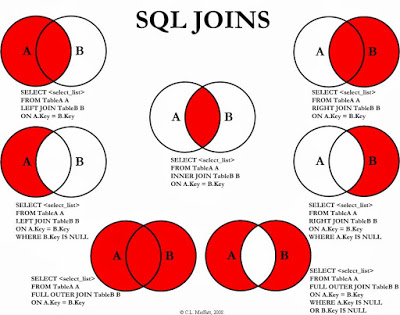
Cartesian product (JOIN or INNER JOIN or CROSS JOIN)
Simply select from two tables is equivalent to simply JOIN, CROSS JOIN, and INNER JOIN. Doing so will result a data frame with $M\times N$ row if M and N are the row counts for table 1 and 2 respectively.
Summary
- select … from two tables
- join
- cross join
- inner join
-- Simply select from
SELECT *
FROM Frequents, Likes -- LIMIT 5;
-- JOIN
SELECT *
FROM Frequents
JOIN Likes -- LIMIT 5;
-- CROSS JOIN
SELECT *
FROM Frequents
CROSS JOIN Likes -- LIMIT 5;
-- INNER JOIN
SELECT *
FROM Frequents
INNER JOIN Likes -- LIMIT 5;
+----------+------------+---------+------+
| drinker  | bar        | drinker | beer |
+----------+------------+---------+------+
| Bill     | Mary's bar | Bill    | Bud  |
| Steve    | Joe's bar  | Bill    | Bud  |
| Jennifer | Joe's bar  | Bill    | Bud  |
| David    | Joe's bar  | Bill    | Bud  |
| Steve    | Bob's bar  | Bill    | Bud  |
+----------+------------+---------+------+
5 rows in set (0.00 sec)
Note that if there’re no common columns, it will still do a cartesian product.
Theta/Equi Join (JOIN … ON … or NATURAL JOIN)
As the name suggests, it will match two columns and leave equal columns after they joined.
Summary
- select … from two tables and use where
- (cross/inner/) join … on …
- natural join will eliminate the duplicate column
-- Equi Join using where
SELECT *
FROM Frequents, Likes
WHERE Frequents.drinker = Likes.drinker
-- Equi Join using joins
SELECT *
FROM Frequents
JOIN Likes -- or CROSS JOIN or INNER JOIN
ON Frequents.drinker = Likes.drinker
+----------+------------+----------+------------+
| drinker  | bar        | drinker  | beer       |
+----------+------------+----------+------------+
| Steve    | Bob's bar  | Steve    | Bud        |
| Steve    | Bob's bar  | Steve    | Bud Lite   |
| Steve    | Bob's bar  | Steve    | Michelob   |
| Steve    | Bob's bar  | Steve    | Summerbrew |
| Jennifer | Joe's bar  | Jennifer | Bud        |
| Steve    | Joe's bar  | Steve    | Bud        |
| Steve    | Joe's bar  | Steve    | Bud Lite   |
| Steve    | Joe's bar  | Steve    | Michelob   |
| Steve    | Joe's bar  | Steve    | Summerbrew |
| Bill     | Mary's bar | Bill     | Bud        |
+----------+------------+----------+------------+
10 rows in set (0.00 sec)
Note that two drinker columns are exactly the same.
In addition to these join queries, there’s also a clause called NATURAL JOIN. It’s the same with them, but it will only keep one column if they are the same.
-- Equi Join using natural join
SELECT *
FROM Frequents
NATURAL JOIN Likes
ON Frequents.drinker = Likes.drinker -- when using natural join, ON clause can be ignored
+----------+------------+------------+
| drinker  | bar        | beer       |
+----------+------------+------------+
| Steve    | Bob's bar  | Bud        |
| Steve    | Bob's bar  | Bud Lite   |
| Steve    | Bob's bar  | Michelob   |
| Steve    | Bob's bar  | Summerbrew |
| Jennifer | Joe's bar  | Bud        |
| Steve    | Joe's bar  | Bud        |
| Steve    | Joe's bar  | Bud Lite   |
| Steve    | Joe's bar  | Michelob   |
| Steve    | Joe's bar  | Summerbrew |
| Bill     | Mary's bar | Bud        |
+----------+------------+------------+
10 rows in set (0.00 sec)
Note that there is only one drinker column.
LEFT/RIGHT JOIN
I’ll skip this part since it’s very easy to see on a Venn diagram. LEFT JOIN will keep all the rows of the left table.
FULL OUTER JOIN in MySQL
SELECT * FROM R
LEFT JOIN S -- be careful that NATURAL LEFT JOIN without ON clause may contain duplicates
ON R.a=S.a
UNION
SELECT * FROM R
RIGHT JOIN S
ON R.a=S.a
Or with natural join…
SELECT R.a, b, c FROM R
NATURAL LEFT JOIN S
UNION
SELECT S.a, b, c FROM R
NATURAL RIGHT JOIN S
Relation as Bags
Bag Semantics for SELECT-FROM-WHERE Queries
-
Bag Semantics vs Set Semantics
- Set semantics remove the duplicates while bag semantics keep duplicates
- The SELECT-FROM-WHERE statement uses bag or multisets semantics, meaning that they keep duplicates
- Selection ($\sigma$)
- Projection ($\Pi$)
- Cartesian product, join ($\bowtie$)
- In the ordinary relational model, relations are sets of tuples, which by definition do not contain “duplicate” entries. However, RDBMSs typically implement a variation of this model where relations are bags (or multisets) of tuples, with duplicates allowed.
Set Operations on Bags (multisets)
- Union
- SQL: ( subquery ) UNION ( subquery )
- Add together and remove duplicates
- Ex: $\{a,b,b,c\} \cup \{a,b,b,b,e,f,f\} = \{a,b,c,e,f\}$
- Difference (Not in MySQL)
- SQL: ( subquery ) DIFFERENCE ( subquery )
- Subtract the number of occurrences, do nothing if there’s not enough to be subtracted and remove duplicates
- Ex: $\{a,b,b,b,c,c\} - \{b,c,c,c,d\} = \{a,b\}$
- Intersection (Not in MySQL)
- SQL: ( subquery ) INTERSECT ( subquery )
- Minimum of the two numbers of occurrences
- $\{a,b,b,b,c,c\} \cap \{b,b,c,c,c,c,d\} = \{b,b,c,c\}$
- Union All
- SQL: ( subquery ) UNION ALL ( subquery )
- Simply add together
- Ex: $\{a,b,b,c\} \cup \{a,b,b,b,e,f,f\} = \{a,a,b,b,b,b,b,c,e,f,f\}$
- Except (Not in MySQL)
- SQL: ( subquery ) EXCEPT ( subquery )
- Subtract the number of occurrences, do nothing if there’s not enough to be subtracted
- Ex: $\{a,b,b,b,c,c\} - \{b,c,c,c,d\} = \{a,b,b\}$
Subqueries
Subquery in FROM
A parenthesized SELECT-FROM-WHERE statement (subquery) can be used in FROM clause
- Example:
SELECT * FROM (SELECT * FROM Beers) as b- Note tuple variable needed to name the relation generated by the subquery
Subquery in WHERE
- Introduced by
=(or!=)- x
=(subquery) - x can be an attribute or a tuple of attributes
- Subquery needs to return exactly one result (row)
- x
- Introduced by
IN(orNOT IN)- x
IN(subquery) - Subquery may return multiple results (rows)
- Equivalences
- x
=any(subquery) $\iff$ xIN(subquery) - x
!=all(subquery) $\iff$ xNOT IN(subquery)
- x
- x
- Introduced by comparison operators
- <comparison operator> <any/all> (subquery)
- Comparison operators:
=,!=,<,>,<=,>=,<>
- Comparison operators:
- Examples
- x
>=ALL(subquery) - x
<=ALL(subquery) - x
=ANY(subquery) // equivalent to “xIN(subquery)” - x
!=ALL(subquery) // equivalent to “xNOT in(subquery)”
- x
- <comparison operator> <any/all> (subquery)
-- select the max price from Sells
SELECT beer FROM Sells
WHERE price >= ALL( SELECT price FROM Sells
                    WHERE price IS NOT NULL ) -- must exclude NULL values
- Introduced by
EXISTSorNOT EXISTS-
EXISTS(subquery)- Evaluated to true if subquery has at least one result
-
NOT EXISTS(subquery)- Evaluated to true if subquery has no results
-
-- select rows where manf only has one beer
select * from Beers b1
where not exists (select name from Beers b2
                  where b2.name != b1.name and b2.manf=b1.manf);